How a green screen photo booth works
Chroma keying replaces every pixel close to the backdrop’s color with the scene image. The guests stay, the green disappears. The result depends mostly on the backdrop and the lighting: a stretched fabric, evenly lit, gives clean edges from the first setting.
- On the raw shotKeying happens on the camera’s photo, before the filter: a guest who picks black and white gets a black and white scene too.
- One backdrop per sessionThe first backdrop, or one picked at random each session. Every pose, the print and the shared photo carry the same one.
- OfflineBackdrops are downloaded with the event. The night holds up with no Wi-Fi, like the rest of the booth.
- Never blockingIf a backdrop is missing or keying fails, the original pose goes to print. Guests always leave with their photo.
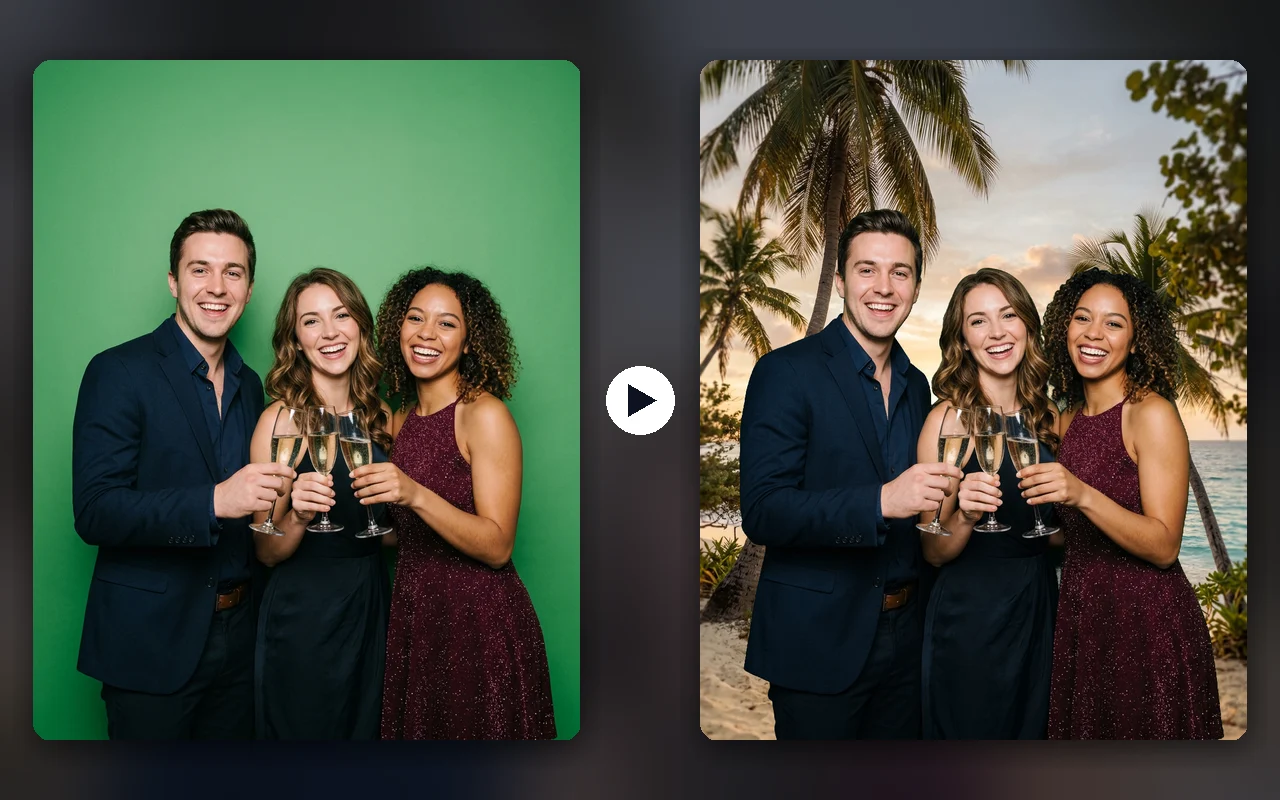
The settings in Froozbooth
Everything is prepared in the dashboard, in the event’s effects, and the booth picks up the configuration when it syncs.
| Setting | What it does | Starting point |
|---|---|---|
| Backdrop color | The color to remove, picked with a color picker | Chroma green #00B140, or blue for a guest wearing green |
| Tolerance | How far from the color still counts as backdrop | Raise it if folds stay green |
| Softness | The width of the transition between guest and scene | Enough for hair without jagged edges |
| Spill removal | Removes the green fringe on shoulders and hair | Stronger if the backdrop is close to the guests |
| Backdrops | Your images: beach, logo, reception hall | Same aspect ratio as the photo, high resolution |
| Backdrop choice | Always the first, or one at random per session | Random for parties, the first for a brand |
Green screen works with everything else: templates, color filters, post-processing, QR, gallery. It turns off with one switch, event by event. All Froozbooth features
Setting up the backdrop and lights
- A matte, wrinkle-free fabric, stretched on a frame or a stand: an 8 × 8 ft (2.5 × 2.5 m) backdrop covers a group of four to six people.
- Guests at least 5 ft (1.5 m) from the backdrop: fewer cast shadows and less green spill on shoulders.
- Two lights for the backdrop, one on each side, and one light facing the guests: an evenly lit backdrop keys out with a single setting.
- No clothing in the backdrop’s color. Warn the couple, or switch to a blue backdrop when the theme is green.
- Take a few test shots on site before opening, with the night’s backdrop, then adjust tolerance and softness.
The camera matters too: a well-exposed DSLR or mirrorless gives cleaner green than a webcam in a dark room. Which camera for a photo booth
Green screen or AI background removal?
| Criterion | Green screen | AI removal, no backdrop |
|---|---|---|
| Edge sharpness on a print | Excellent if the backdrop is well lit | Uneven on hair, hands and groups |
| Equipment | A stretched backdrop and two lights | No backdrop |
| Network | Not needed | Often required |
| Processing time | A few tens of milliseconds | One to several seconds per pose |
| Cost | Included in Froozbooth | Often per plan or per generation |
To transform the photo itself, with outfits, paintings or a movie mood, Froozbooth also offers AI portraits, with styles written by the rental company. AI photo booth software
What green screen lets you sell
- Weddings: the place of the proposal, the honeymoon city, a castle in the snow.
- Corporate events and trade shows: the brand’s logo and colors behind every guest, with no banner to print.
- Birthdays and theme parties: the 80s, outer space, the tropics, a different scene each session.
- Several events on the same weekend: one green screen in the van, one backdrop per client.
It is an option you bill on top of the rental: the backdrop and lights pay for themselves in a few bookings. How much to charge for a photo booth rental
Frequently asked questions
Does Froozbooth do green screen?
Yes. Green screen keying is included in every plan, with no credits. You choose the color, tolerance, edge softness and green spill removal in the dashboard, upload your backdrops, and the booth does the processing itself, with no network.
Does a green screen photo booth work without internet?
Yes. Backdrops are downloaded with the event when it syncs, and keying is processed in the booth. No photo is sent to a server to remove the background.
What size green screen for a photo booth?
Plan on 8 × 8 ft (2.5 × 2.5 m) for a group of four to six people, and 5 × 6.5 ft (1.5 × 2 m) for portraits of two. The backdrop should extend past the camera’s frame on the sides, and onto the floor if guests are shown full length.
How do I avoid a green fringe around guests?
Keep guests at least 5 ft (1.5 m) from the backdrop, light the backdrop separately, and raise the “spill removal” setting in Froozbooth. The fringe comes from green light bounced by the fabric onto shoulders and hair.
Can I use a blue screen instead of a green screen?
Yes. The color to remove is chosen in the dashboard: a blue backdrop works when a guest or the decor wears green.
Can I use several backdrops at one event?
Yes. Add as many backdrops as you like: the booth takes the first one, or picks one at random each session. Every pose of a session, the print and the photo shared by QR carry the same backdrop.
Does green screen slow the booth down?
No. Keying takes a few tens of milliseconds per pose, at print size, on an ordinary Windows PC with no graphics card.
Should I use a green screen or AI background removal?
For a sharp print, green screen is still the most reliable: clean edges on hair and props, no network, no cost per photo. AI background removal saves setting up a backdrop but gives less consistent results on groups, and often goes through a server.